

INSTALLATION
TROUBLESHOOTING
Ferrum One Guide
Manual how to connect, set up, and update Ferrum One to use it with DMA cheats and with Xim Matrix and how to solve possible errors.
This guide will not work other models of arduino or kmbox.
You can buy Ferrum One here

DOWNLOAD
Recommended Hardware
Recommended USB cable — you can use any USB 2.0 or 3.0 cable
Recommended mouse — any wired or wireless mouse.
If you don't have a Second PC we recommend — Mini PC
Recommended OS — Windows 11
Connecting Ferrum
-
Download and keep the DMA Cheats folder on your Second PC.
1. Connect USB cables and mouse from your Main PC to the Ferrum as shown below:
P.S. To control your Second PC, you need to use a separate mouse which is connected directly to your Second PC.

2. Go to the DMA Cheats\8. Ferrum\Driver folder on your Second PC, right click on silabser.inf and click Install.

You should see this message.

3. Go to the DMA Cheats/8. Ferrum folder on your Second PC and run Ferrum-Installer.exe.
4. Complete the installation process. If you see such a window, then click Install.

5. Run Ferrum Utility (it will be on the desktop on your Second PC).
If you see this message, restart your Second PC.
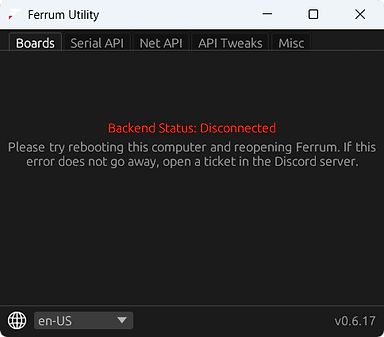
6. After restart, run Ferrum Utility again. If you see a suggestion to install an update, do so.

Everything is ready. When you run DMA cheats, Ferrum will most likely connect automatically.

But if you need the COM number or IP address for the connection, you can find them on these tabs:


Video Manual
How to use it with Xim Matrix
1. Connect, set up and install necessary driver for Xim Matrix, according to this guide.

2. Connect Ferrum as shown below.
Don't try to connect Feruum directly to Xim Matrix, follow our diagrams.
3. Launch a game you are going to play.
Make sure that the output devices in the game settings are be mouse and keyboard.

4. Launch DMA cheat, set up aimbot if you haven't done it yet.
Everything is ready, your gamepad emulates the operation of the mouse and keyboard, and when you shooting on gamepad, the aimbot will work according to the settings of your cheat.

I recommend watching the Video Manual to get it right.
You can also visit the Xim Matrix developer's website to find more information on setting it up and troubleshooting — https://guide.xim.tech
Video Manual
Windows blocking driver
If Windows blocks the com0com.sys driver during the installation of the Ferrum application, follow these steps:
-
First, check whether the driver was installed. To do this, open Device Manager on the second PC. If you see a com0com.sys device with a yellow warning triangle, it means the driver was not installed correctly, and the following instructions apply to your case.
-
Open "Add or remove programs" in Windows settings on your Second PC and uninstall Ferrum app.
-
Open the BIOS on your Second PC. If you have an AMD processor, disable: IOMMU, SVM, Secure boot.
If you have an Intel processor, disable: VT-d, Intel Virtualization Technology (VT-x), Secure boot.
-
Turn on your Second PC, go to Windows settings >> Core isolation and disable everything.

-
Then restart your Second PC.
-
After restarting, open PowerShell as Administrator and enter the following commands one by one:
mountvol S: /s
Remove-Item "S:\EFI\Microsoft\Boot\CiPolicies\Active\{8F9CB695-5D48-48D6-A329-7202B44607E3}.cip" -Force
Remove-Item "$env:windir\System32\CodeIntegrity\CiPolicies\Active\{8F9CB695-5D48-48D6-A329-7202B44607E3}.cip" -Force
mountvol S: /d
citool -lp -json | ConvertFrom-Json | Select-Object -ExpandProperty Policies | Where-Object {$_.PolicyID -eq "8F9CB695-5D48-48D6-A329-7202B44607E3"} | Format-List *
-
Restart your Second PC.
-
Install Ferrum Utility.
-
Now if everything was done correctly, you will see this in the Device Manager on your Second PC and Ferrum application will work well.

Mouse doesn't work
If the mouse connected to the Ferrum doesn't work on your Main PC, try the following:
-
Reconnect all the cables and mouse.
-
Restart both computers.
-
If you have some branded mouse, install official application for it and update the drivers.
-
If none of the above solutions helped, your mouse is most likely not supported by Ferrum, and you will need to use a different mouse.
Aimbot is not Working
If you have successfully connected and configured Ferrum, but the aimbot is not working in-game:
-
Make sure that he cheat has detected and successfully connected the Ferrum. Almost all the cheats have the Kmbox Test function (it also works to test the Ferrum), use it and check if the mouse cursor is moving on the Main PC. If the cursor doesn't move during the test, then Ferrum has not connected to the cheat. Contact the cheat technical support for assistance.
-
Make sure that you have configured Aimbot correctly in the cheat settings, and selected the button to activate aimbot.
Where to download?
You can download DMA Cheats folder here — https://www.dma-cheats.com/download
